Company Resources
Shared resources across all IPP products. test
test
using System;
using System.Net.Http;

using Newtonsoft.Json;
using Newtonsoft.Json.Linq;

using System.Security.Cryptography.X509Certificates;

public void SendHTTPRequest(HttpClient client){
  client.DefaultRequestHeaders.Add("Integration-Key", "Your integration key");

  //Starting the POST request
  var syncRequest = new HttpRequestMessage("https://192.168.1.105/api/v1/Payments")
  {
      Content = new StringContent(JsonConvert.SerializeObject(
      new
      {
          amounts = new
          {
              currencySymbol = "SEK",
              @base = 100
          },
          sendReceipt = true,
      },
      Formatting.Indented, new JsonSerializerSettings
      {
          NullValueHandling = NullValueHandling.Ignore
      }
      ), Encoding.UTF8, "application/json")
  };


  var response = client.Send(syncRequest);
  var statuscode1 = response.StatusCode;
}

public HttpClientHandler CertHandler()
{
    try
    {
        //generic common name
        var commonName = "wl-samport-terminal-server-v1";

        //path to cert
        var path = "Certs\\ECR-REST.crt";

        X509Certificate2 cert = new X509Certificate2(path);

        var handler = new HttpClientHandler();
        //specify our own ServerCertificateCustomValidationCallback in order to
        //supply our custom root certificate and to validate the commonname
        handler.ServerCertificateCustomValidationCallback = (requestMessage, certificate, chain, sslErrors) =>
                {
                    if (certificate != null && chain != null)
                    {
                        chain.ChainPolicy.TrustMode = X509ChainTrustMode.CustomRootTrust;
                        chain.ChainPolicy.CustomTrustStore.Add(cert);

                        // We can also return choose to simply "return true;" here, We dont have
                        // to confirm the commonName if we dont want to(doesn't decrease the amount of encryption)
                        return chain.Build(certificate) && certificate.Subject.Contains("CN=" + commonName);
                    }
                    return false;
                };
        return handler;
    }
    catch (Exception e)
    {
        Console.WriteLine("Exception: "+ e.Message);
    }
    return new HttpClientHandler();
}
1
Become a Partner
- Complete the Worldline onboarding process. Refer to Become a Partner section.
- Register your merchant account.
- Obtain your UMID, UTID, and API credentials.
2
Gather Your Credentials
Before you begin, ensure you have:
- UMID (Unique Merchant ID)
- UTID (Unique Terminal ID)
- API Bearer Token
- A registered payment terminal
- Internet connectivity
3
Install Terminal API
If Terminal API is already installed, skip this step.
1. Open the terminal launcher.
2. Open the App Drawer.
3. Launch SmartPOS Store.
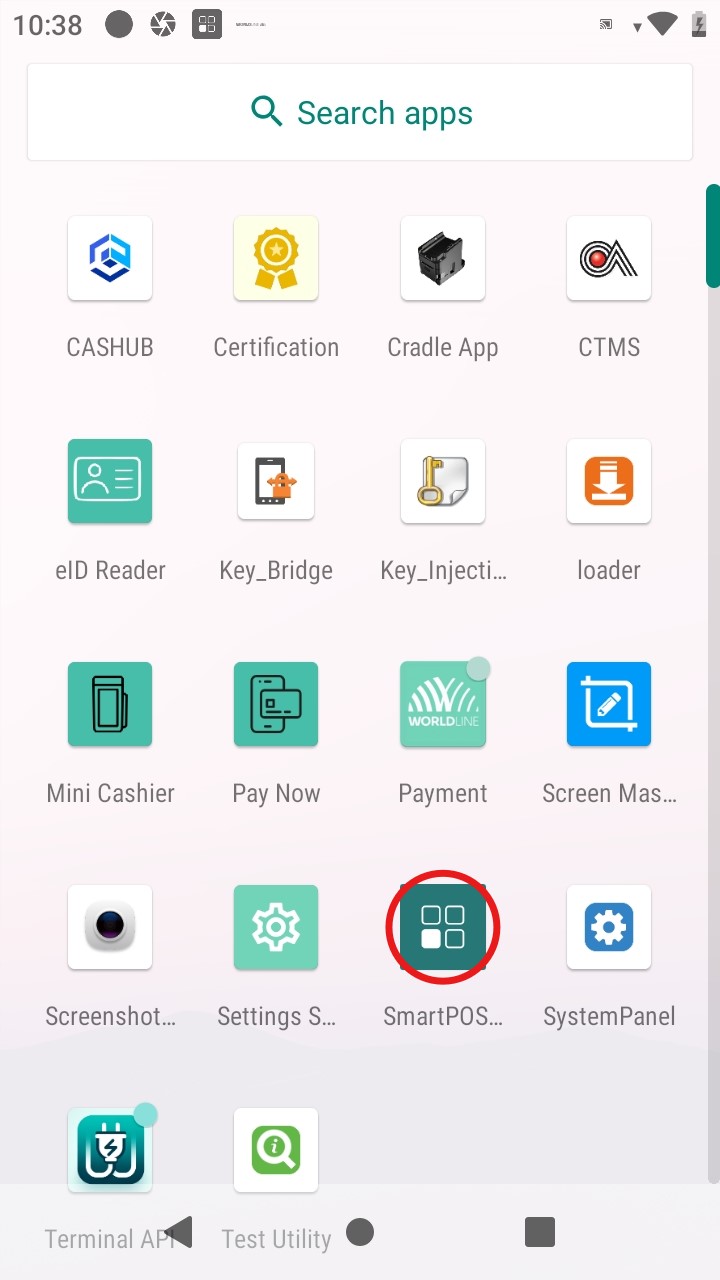
4. Open the All tab.
Getting Started
Learn the prerequisites, gather credentials, prepare your environment, and install and configure
Integration
Learn about the cloud-to-cloud architecture, security requirements, Nexo messaging, and communication patterns. test
Error handling
Troubleshoot HTTP and API errors, terminal issues, connectivity problems, and transaction failures.
test
test
testSamport